Give your agent a pass for 20 calls and 10 minutes.
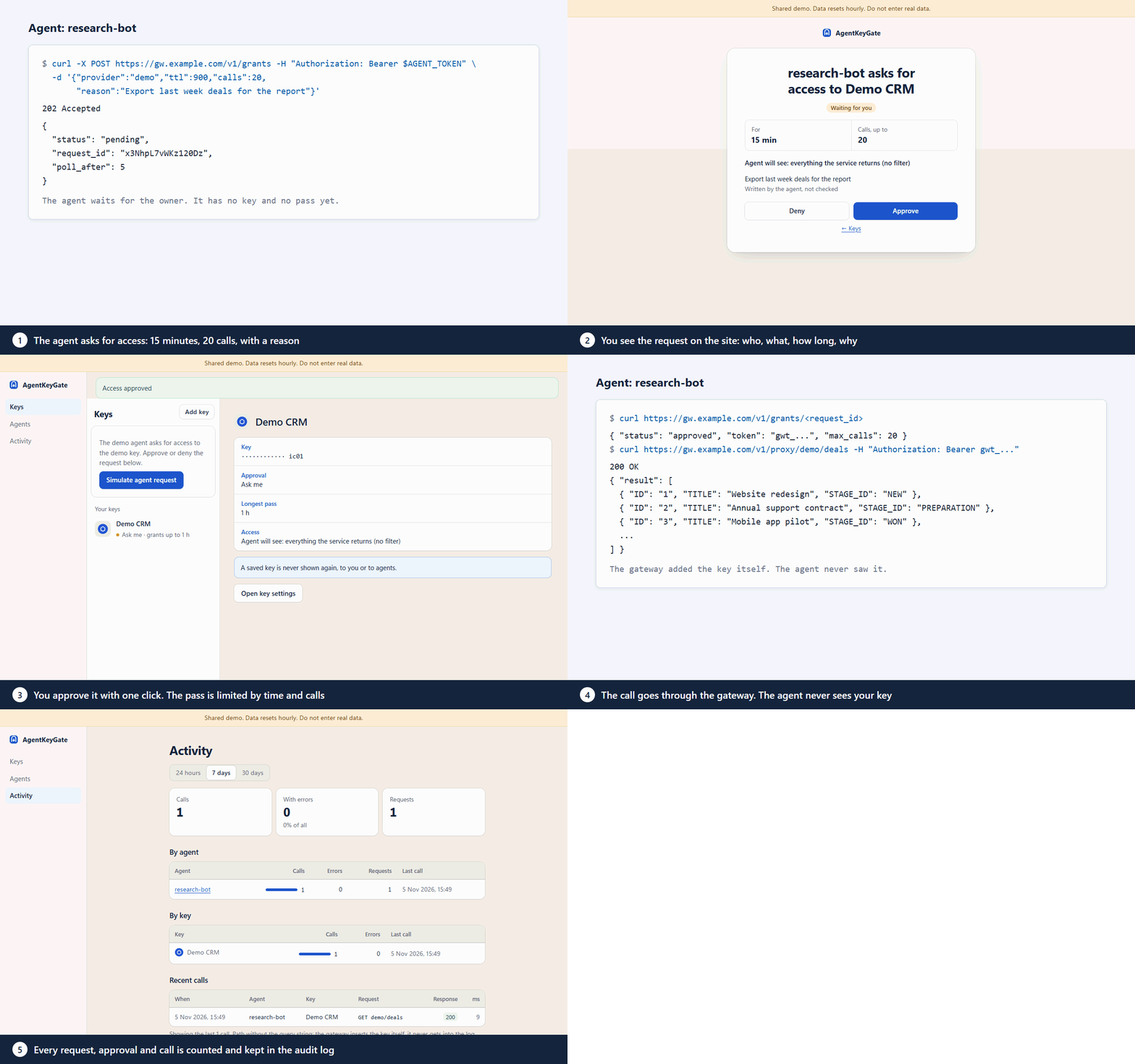
The agent says why it needs access. You approve in Telegram or on the web. The gateway adds your key to each call and closes the pass when the limit runs out.
Free and open source, Apache-2.0. Runs on your own server.
 sales-agent asks for access to Bitrix24
- For
- 10 min
- Calls, up to
- 20
Agent will see: deals and leads without names, phones, e‑mails or comments
Weekly report: leads that changed status since Monday
Written by the agent, not checked
Example request. Telegram and Slack get the same facts: agent, service, time, calls, reason.
An agent can do everything its key can.
- Agents read
.envfiles even when deny rules say no.claude-code issue #24846 - A prompt injection in a web page or a ticket can ask the agent to send its keys somewhere else.Prompt injection
- A key with full rights gives the agent full rights, for as long as the key lives.Blast radius
- A sandbox does not help once the key is already in the agent's memory.Sandboxing
- A CRM webhook link is a key too: whoever has the link gets its rights.CRM webhooks
How a call goes through
- 1The agent asks
It names the service, how long, how many calls, and why.
- 2You decide
The request comes to Telegram, Slack or e‑mail with all the facts. Approve or deny in Telegram or on the web.
- 3The gateway makes the call
It adds your key, counts the call and filters the response. When the time or the calls run out, the pass stops working.
Revoke a pass or a whole agent at any time. It takes effect on the next call.
You decide what comes back from your CRM.
CRM keys are read-only by default. You tick the data types and fields the agent can see, and the gateway removes the rest from the response.
{
  "result": [{
    "ID": "4182",
    "TITLE": "Anna Lee, website redesign",
    "STATUS_ID": "IN_PROCESS",
    "ASSIGNED_BY_ID": "12",
    "OPPORTUNITY": "12400.00",
    "CURRENCY_ID": "USD",
    "NAME": "Anna",
    "LAST_NAME": "Lee",
    "PHONE": [{ "VALUE": "+1 415 555 0134" }],
    "EMAIL": [{ "VALUE": "anna.lee@example.com" }],
    "COMMENTS": "Asked for a discount, call after 5 pm"
  }]
}{
"result": [{
"ID": "4182",
"STATUS_ID": "IN_PROCESS",
"ASSIGNED_BY_ID": "12",
"OPPORTUNITY": "12400.00",
"CURRENCY_ID": "USD"
}]
}If you allow a free-text field, turn on mask: e‑mails, phone numbers written with +, card numbers and IBANs become ****. Before a request is approved, you see an “Agent will see” line.
What it protects, and what it does not
Protects
- Keys stay on your server.Encrypted in AWS SSM or in an encrypted file vault. Agents get passes, never keys.
- Every key has a policy.Always, ask or deny, with the channels and hours you choose.
- Read-only by default for CRM and support keys.A write returns 403 and spends no quota.
- Weakening a rule needs a fresh 2FA code.Tightening needs none.
- No secrets in logs.Key values never appear in logs, URLs, responses or errors.
- Fails closed.If the vault or the database is down, agents get 503.
Does not protect
- Against root on the server.Anyone with root or cloud admin rights can read the keys.
- Against misuse inside the pass.Within its limits the agent can make any call the key allows. Give it narrow keys.
- From the service you call.It sees the key and the data you send.
- Every kind of personal data.Mask does not find names and addresses, or phone numbers written without +.
- Your own accounts.If someone takes over your Telegram or e‑mail, they can approve requests.
Works with the agents you already use
Connect over MCP (Streamable HTTP with a bearer token) or plain HTTP. Any script that can send an HTTP request works too.
 Claude Code
 Codex CLI
 Cursor
 Copilot in VS Code
 Gemini CLI
 Hermes Agent
 OpenClaw
Install on your server
Debian 12 or Ubuntu 24.04 and a domain pointed at the server. The script installs Node.js 22, Caddy and systemd services, then prints a one-time setup link.
curl -fsSL https://raw.githubusercontent.com/maximskorohod/agentkeygate/v1.0.1/scripts/setup.sh -o setup.sh
echo "40c9cc59c14ca795263b537325f624f709f3e2e670d93221d8e99ddd76147a15  setup.sh" | sha256sum -c -
sudo bash setup.sh --domain gw.example.com
# outside AWS add: --vault fileSimilar tools
Other projects also keep keys away from agents. Here is what each one says on its own pages.
| AgentKeyGate | OneCLI | TAP | Infisical Agent Vault | |
|---|---|---|---|---|
| License | Apache-2.0 | Apache-2.0, ee/ under a separate license | Apache-2.0 | MIT core, some features paid |
| Self-hosted | Yes | Yes, also a cloud | Yes, also hosted | Yes, also a cloud |
| Owner approves a request | Each request, in Telegram or on the web | Yes, in chat | Yes: dashboard, Telegram, Matrix, passkey | Rules set in advance |
| Pass limited by number of calls | Yes, plus time | Not described | Not described | Time-bound sessions |
| Response field filter and masking | Yes, for CRM and some other services | Not described | Removes the token from responses | Not described |
| Price | Free | Free tier and paid plans | Not listed | Priced separately |
Checked on 7 November 2026. “Not described” means we did not find it on their pages.
Want this set up for your CRM?
I set up AI agents for Bitrix24, amoCRM and other CRMs on your own server, with the keys behind this gateway. Work is done in writing: a short brief, a written plan, updates as it goes.
Write to mehello@agentkeygate.com